
Choosing a forex broker involves weighing multiple factors beyond spreads alone. You need to compare trading costs (spreads, commissions, and overnight fees), available platforms and tools, the range of instruments offered, and the broker's regulatory standing and client protections. This guide explains what to evaluate when selecting a broker and how to structure that comparison without relying on marketing claims or unverified rankings.
Whether you're a beginner planning your first deposit or an active trader evaluating a new platform, understanding these key metrics helps you identify a broker that matches your trading style, capital, and risk tolerance. The information here draws on verified broker practices and is current as of 21 October 2026.
Quick answer: What matters most when choosing a forex broker
The primary selection criteria are trading costs (spreads and commissions combined), platform usability and available tools, the number and type of instruments you can trade, and confirmation that the broker is regulated and holds client funds separately. No single factor determines fit; the broker that suits a scalper differs from one suited to a swing trader.
Begin by defining your trading needs. Then evaluate each broker's offering against those priorities.
What the term means: Forex broker and core features
A forex broker is an intermediary that provides retail traders access to the foreign exchange market and related instruments.
Key terms you'll encounter:
Spread: The difference between the bid (sell) price and ask (buy) price of a currency pair. It's a primary cost of trading and varies by pair, market conditions, and account type.
Commission: A separate fee some brokers charge per lot traded, independent of the spread. Brokers may offer zero commission with spreads built in, or raw spreads with a per-lot fee.
Leverage: Borrowed capital that increases your market exposure. Leverage of 1:100 means you can control a $100,000 position with $1,000 of your own capital. It amplifies both gains and losses.
Margin: The capital required to open and maintain a leveraged position.
MetaTrader 5 (MT5): A multi-asset trading platform used for forex and CFDs, offering advanced charting, technical indicators, and algorithmic trading via Expert Advisors.
TradeLocker: A trading platform that integrates TradingView charts, providing comprehensive charting tools alongside trade execution and account management.
Segregated Accounts: Client funds held separately from the broker's operational funds, providing an additional layer of protection.
Negative Balance Protection: A safeguard ensuring retail clients cannot lose more money than they've deposited.
Regulation: Oversight by a financial authority designed to protect traders and ensure fair trading practices.
How it works: A structured approach to evaluating brokers
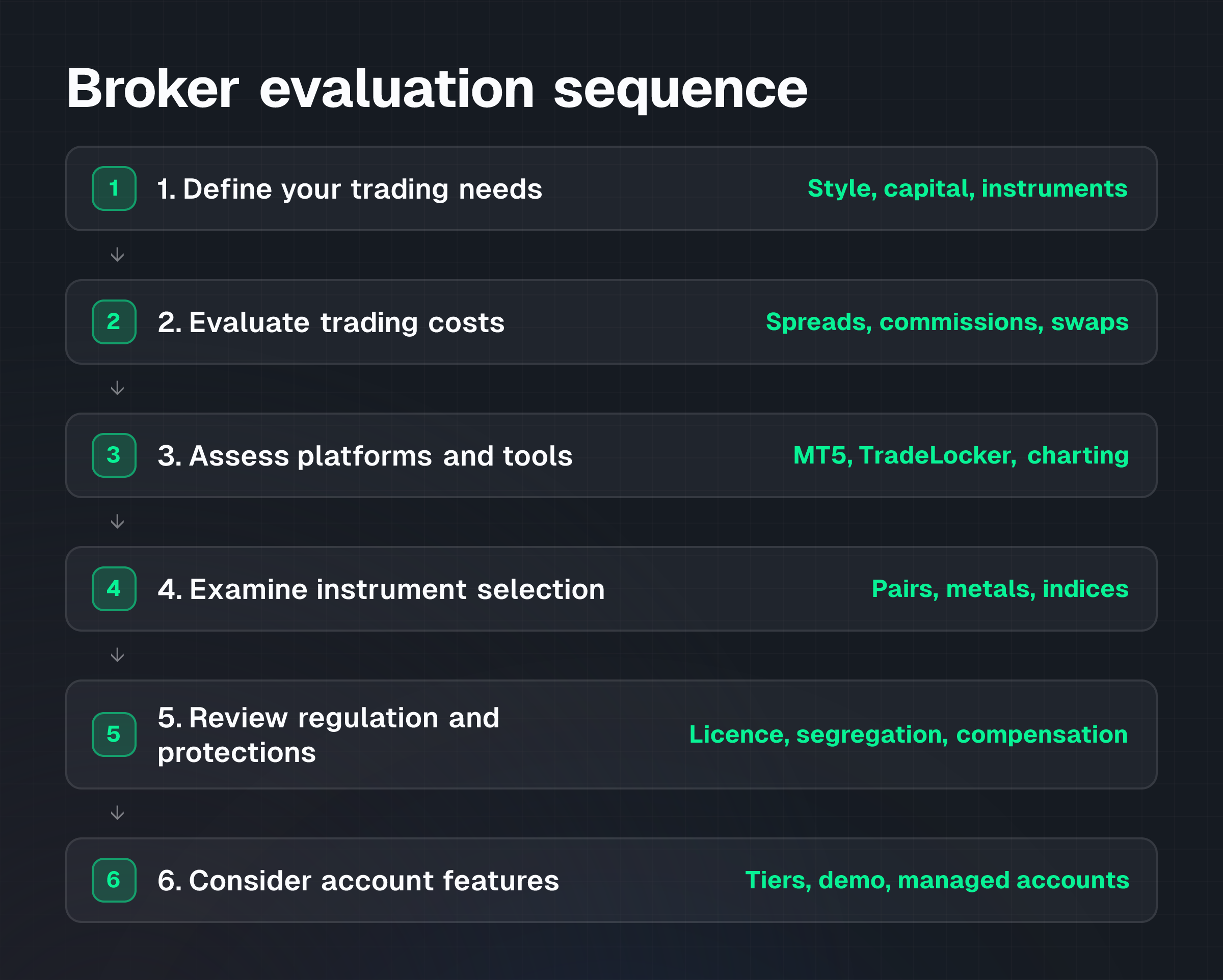
Comparing brokers effectively follows a logical sequence. Start by defining your own needs, then evaluate each broker against those criteria.
Step 1: Define your trading needs
Before comparing brokers, clarify what you're trying to achieve.
Trading style: Do you scalp (many small trades per day), swing trade (positions held days to weeks), or use algorithmic strategies? Some brokers restrict scalping or automated trading; others actively support it. NextTrade allows scalping, hedging, and Expert Advisors on both MetaTrader 5 and TradeLocker.
Starting capital: How much are you depositing? Account minimums vary. NextTrade offers Standard accounts from $25, Raw accounts from $100, and VIP accounts from $10,000, allowing you to match your deposit to your account tier.
Instruments: Which markets do you want to trade?
NextTrade provides 131 instruments spanning major currency pairs, precious metals, energies, and stock indices.
Step 2: Evaluate trading costs
Trading costs compound over hundreds of trades. They vary significantly across brokers and account types.
Spreads: Compare the typical spread on pairs you trade most frequently. Spreads may be fixed or variable. NextTrade's Raw and VIP accounts offer spreads from 0.0 pips on forex, metals, and energies, meaning you pay only the commission per lot.
Commission structure: Some brokers charge no commission with spreads built in (all-in pricing). Others charge raw spreads plus a per-lot fee. NextTrade's Standard account charges no commission, with costs built into the spread. The Raw account charges $6-7 per lot round trip, and the VIP account charges $4 per lot round trip, both with raw spreads starting from 0.0 pips.
Overnight financing (swaps): If you hold positions overnight, you pay or receive swap fees depending on the direction and the interest rate differential. NextTrade offers swap-free accounts upon request.
Deposit and withdrawal fees: Check whether funding or withdrawing money incurs charges. NextTrade doesn't charge fees for deposits made via cryptocurrency, or for withdrawals to crypto addresses.
Step 3: Assess trading platforms and tools
The platform is your interface for analysis and execution. Test it before committing capital.
Platform choice: Which platforms does the broker offer? The most common are MetaTrader 5 and proprietary or standalone platforms. NextTrade offers MetaTrader 5 and TradeLocker with TradingView charts at the same pricing, so you choose based on workflow rather than cost difference.
Charting and indicators: Are the analytical tools sufficient for your strategy? TradingView charts are known for comprehensive technical analysis capabilities. Both platforms support custom indicators and strategy development.
Execution speed: How quickly are orders filled? Brokers using ECN (Electronic Communication Network) or STP (Straight Through Processing) models, such as NextTrade's Raw accounts, are designed for millisecond processing speeds.
Mobile trading: Do mobile versions of the platform exist and function reliably? MetaTrader 5 is available on iOS and Android.
Algorithmic trading: If you use Expert Advisors or bots, confirm the platform supports them. MetaTrader 5 supports Expert Advisors natively. TradeLocker includes a Studio bot builder for strategy automation.
Step 4: Examine instrument selection
Confirm the broker offers the specific markets you want to trade.
Currency pairs: Most brokers offer major pairs (EUR/USD, GBP/USD) and many minor and exotic pairs. Check whether your preferred pairs are available.
Asset variety: Do you need metals, commodities, or indices?
NextTrade's 131-instrument offering includes forex, metals, energies, and indices, providing broad coverage across these asset classes.
Step 5: Review regulatory standing and client protections
Regulation and fund segregation are non-negotiable. Verify the broker's license and protections before opening an account.
Regulatory authority: Which financial regulator oversees the broker? NextTrade is regulated by the Financial Services Commission (FSC) of Mauritius under licence GB25204563.
Client fund segregation: Are client funds held in accounts separate from the broker's own capital? NextTrade holds client funds in segregated accounts.
Negative balance protection: Does the broker guarantee that retail clients cannot lose more than their deposit? NextTrade provides negative balance protection for retail accounts.
Investor compensation scheme: If the broker fails, is there a fund to reimburse clients? NextTrade is covered by the Financial Services Commission of Mauritius investor compensation scheme.
Geographic restrictions: Be aware that not all brokers serve all countries. NextTrade isn't available to residents of the US, Canada, Australia, Japan, and several other countries. Check whether the broker operates in your jurisdiction before applying.
Step 6: Consider account features and offerings
Different account tiers serve different trader profiles.
Account types: What are the minimum deposits and leverage limits? NextTrade offers leverage up to 1:1000 across all account types.
Demo accounts: Can you test the platform and practice strategies without risking capital? NextTrade provides demo accounts to familiarize yourself with the platform before trading live.
Managed accounts: If you prefer professional management, does the broker offer managed account options? NextTrade supports managed accounts through PAMM (Percentage Allocation Management Module), where investors can allocate funds to a professional trader's strategy.
Worked example: Comparing costs across account types
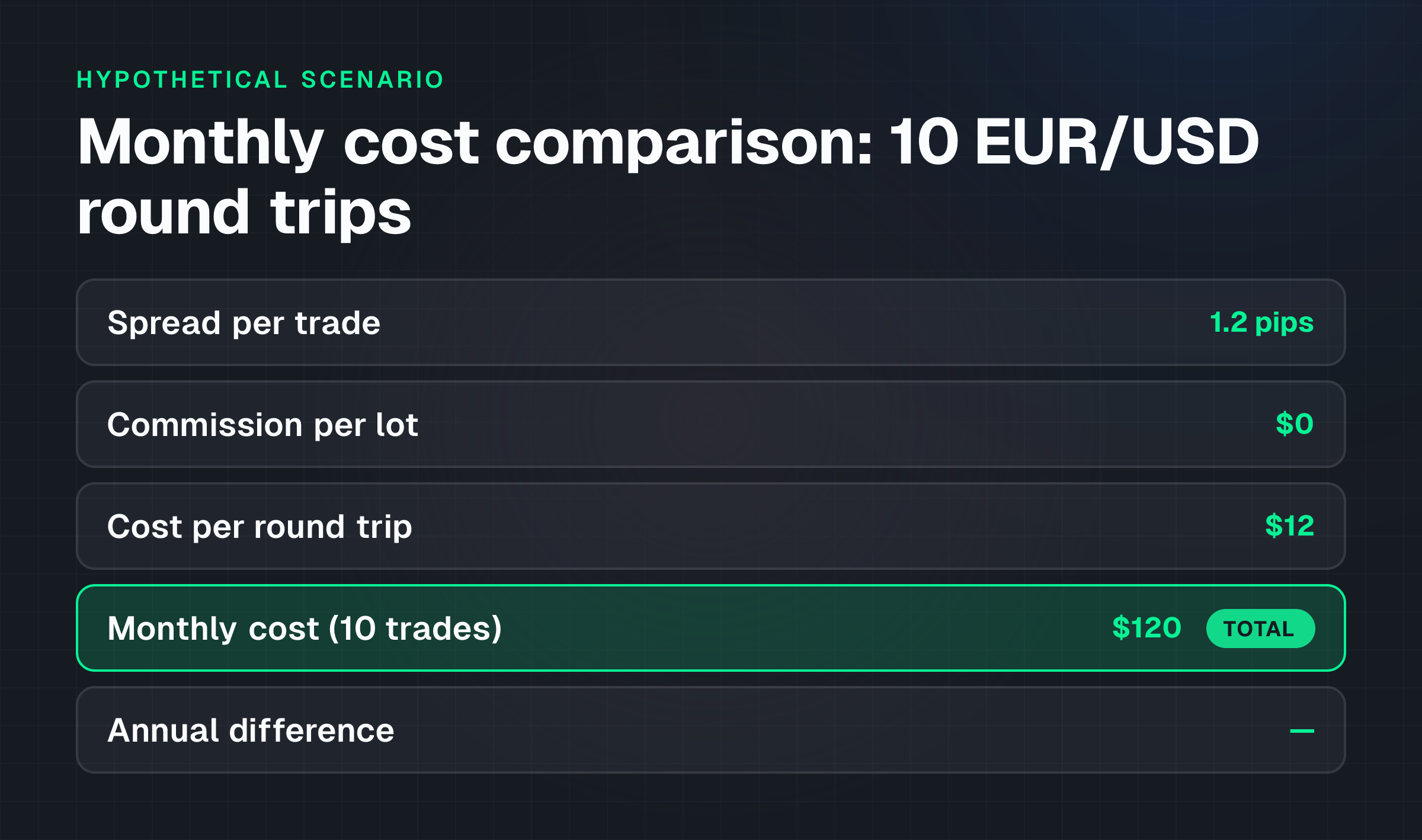
This example illustrates how trading costs differ by account structure. It's hypothetical and educational only; it's not a recommendation to open an account or place a trade.
Scenario: You plan to trade 10 EUR/USD round trips per month. EUR/USD typically trades with tight spreads. You compare the cost of trading on a Standard account versus a Raw account at a broker offering both.
Standard account (no commission):
- Spread on EUR/USD: 1.2 pips per round trip
- Cost per round trip: 1.2 pips × $10 per pip = $12
- Monthly cost for 10 trades: $120
Raw account (0.0 pip spread + commission):
- Spread on EUR/USD: 0.0 pips
- Commission: $7 per lot round trip
- Cost per round trip: $7
- Monthly cost for 10 trades: $70
Difference: The Raw account is $50 cheaper per month ($600 per year) for this scenario, despite requiring a higher minimum deposit ($100 versus $25). However, the Standard account is lower-cost if you trade fewer than 6 round trips monthly, since the $100 deposit requirement for Raw account access would make the trading cost advantage moot relative to capital tied up.
This example assumes stable spreads, specific trade frequency, and standard lot sizes. Actual costs depend on your trading volume, the specific pairs you trade, and market conditions. Always verify current spreads and commissions on the broker's website before trading.
Costs and practical constraints: Hidden and cumulative expenses
Understanding total cost requires looking beyond spreads and commissions.
Spread variability: Spreads widen during volatile market conditions and may be higher on exotic pairs or during low-liquidity sessions. The spreads a broker advertises are typically averages; actual fills may differ.
Slippage: The difference between your expected fill price and the actual price received. Slippage is unpredictable and can worsen your entry or exit cost, especially during fast-moving markets or with large order sizes.
Swap costs: Overnight financing charges accumulate if you hold positions open. A small overnight fee becomes substantial if you hold positions for weeks or months. Always calculate swap costs into long-term position analysis.
Margin requirements: Leverage lets you control larger positions with less capital, but it also means you need to maintain minimum margin levels. If your account falls below the maintenance margin, the broker may close your positions automatically.
Deposit and withdrawal friction: If a broker charges fees for deposits or withdrawals, or if withdrawal methods are limited (e.g., only crypto), repeated transfers compound the cost. NextTrade doesn't charge deposit fees for crypto and offers crypto withdrawals without fees, but cards and bank wire methods are listed as coming soon, which may affect accessibility depending on your location.
Minimum trade sizes: Some brokers enforce minimum position sizes or restrict micro-lot trading. Verify the lot size limits if you plan to trade very small positions to manage risk.
Risks and limitations: What can go wrong
Selecting a broker based on cost alone overlooks significant risks.
Leverage risk: High leverage amplifies losses. Leverage of 1:1000 means a 0.1% move against your position wipes out 10% of your margin. The speed of loss is proportional to leverage. Retail traders often underestimate how quickly margin can be exhausted.
Counterparty risk: Even a regulated broker can fail. Client fund segregation and investor compensation schemes reduce (but don't eliminate) this risk. Never deposit more than you can afford to lose, regardless of regulatory protections.
Slippage and re-quotes: During volatile conditions, a broker may refuse to fill your order at the quoted price and re-quote at a worse price. Scalpers and traders using very tight stops are particularly exposed to this risk.
Platform outages: Technical failures can prevent you from closing a losing position. Test the platform's stability and support responsiveness before trading live.
CFD complexity: CFDs are leveraged derivatives. Retail traders using CFDs lose money more often than they profit. The Financial Services Commission of Mauritius and most financial authorities note that a significant percentage of retail accounts lose money trading CFDs. Never trade CFDs with capital you cannot afford to lose.
Regulatory gaps: Not all regulators enforce the same standards. A broker regulated in one jurisdiction may not offer the same client protections as one regulated in another. Mauritius-regulated brokers operate under FSC oversight, but standards differ from regulators in larger financial centres.
Common misunderstandings: What traders often get wrong
Avoiding these misconceptions improves your broker selection.
Misconception: "The lowest spread is the best deal."
A broker with 0.5 pip spreads and $20 per lot commission may cost more than one with 2 pip spreads and no commission, depending on your trading frequency. Always calculate total cost, not just one component.
Misconception: "A regulated broker cannot fail."
Regulation reduces risk but doesn't eliminate it. Segregated accounts and compensation schemes are safeguards, not guarantees. The 2008 financial crisis and multiple broker failures since then demonstrate that even regulated entities can collapse.
Misconception: "Demo trading proves the live experience will be the same."
Demo accounts often have instant execution and no slippage. Live conditions include re-quotes, requotes, and wider spreads during volatile conditions. Always test live trading with very small positions first.
Misconception: "More instruments mean a better broker."
A broker offering 500 instruments isn't automatically better than one offering 131 if you only trade 10 specific pairs. Instrument count is relevant only if the broker offers the pairs or assets you actually need.
Misconception: "Leverage up to 1:1000 means you should use it."
Maximum leverage is available, not a recommendation. Most professional traders use leverage of 1:10 to 1:50 to manage risk. High leverage amplifies losses as much as gains.
Practical checklist: Steps to take before opening an account
Use this checklist to evaluate a broker systematically:
- Confirm regulation. Verify the broker's license number with the regulator's website. For NextTrade, check the FSC of Mauritius registry using licence GB25204563.
- Check fund segregation and protections. Confirm that the broker segregates client funds and offers negative balance protection for retail accounts.
- Compare spreads on your key pairs. Obtain live spreads (not averages) for the currency pairs or instruments you trade most, on each account type.
- Calculate total trading cost. Add spreads, commissions, and swap fees for a typical trade on your expected volume. Compare across account types and brokers.
- Test the platform. Open a demo account and spend 1-2 weeks using the platform, placing practice trades, and exploring the tools. Confirm that the charting, indicators, and order execution feel familiar and functional.
- Check deposit and withdrawal methods. Confirm that the broker supports the payment methods available to you and that withdrawal fees (if any) are acceptable.
- Review the terms. Read the broker's Client Agreement and Trading Terms for any restrictions on scalping, hedging, or Expert Advisors if those strategies matter to you. NextTrade explicitly allows these, but not all brokers do.
- Verify geographic eligibility. Confirm that the broker accepts clients from your country. NextTrade isn't available to residents of the US, Canada, Australia, Japan, and several other countries.
- Start small. Open a live account with a minimum deposit and place a few small trades before committing significant capital. This confirms that deposits, withdrawals, and live execution work as expected.
Frequently asked questions
What is the difference between spreads and commissions?
A spread is the difference between the bid and ask price, charged automatically on every trade. Commission is a separate per-lot fee, charged by some brokers in addition to the spread.
A broker with a 1 pip spread and no commission charges differently than one with 0.0 pip spreads and $7 per lot commission. Always calculate the total cost for your trading volume and style.
Can I trade on a demo account forever?
Yes, demo accounts remain open indefinitely, but they don't replicate live trading conditions. Demo fills are typically instant and slippage-free, whereas live execution includes re-quotes and variable spreads during volatile conditions.
Use a demo to learn the platform, then open a live account with a small deposit to experience real trading costs and execution.
What leverage should I use?
Leverage choice depends on your risk tolerance and strategy. Beginners typically use 1:10 to 1:50 leverage; experienced traders may use higher levels. Higher leverage increases both gains and losses. A 1% market move against a 1:1000 leveraged position loses 100% of margin.
NextTrade offers leverage up to 1:1000, but maximum available leverage isn't a recommendation to use it.
Is a broker offering 131 instruments better than one offering 50?
Only if you trade instruments beyond the 50 offered by the other broker. If both brokers offer your primary pairs and assets, instrument count doesn't matter. Evaluate based on the specific instruments you plan to trade, not on abstract variety.
What is negative balance protection and why does it matter?
Negative balance protection ensures retail clients cannot lose more than their deposit. If a position closes at a loss exceeding your account balance (due to extreme market moves or slippage), the broker covers the shortfall. This safeguard is mandatory in some jurisdictions and optional in others.
NextTrade provides it for retail accounts.
Should I choose MetaTrader 5 or TradeLocker?
Both are fully functional platforms. MetaTrader 5 is industry-standard and widely familiar; it supports Expert Advisors natively. TradeLocker integrates TradingView charts natively and includes a Studio bot builder.
Choose based on your preferred charting interface and whether you use bots or Expert Advisors. At NextTrade, pricing is the same on both platforms, so the choice is based on workflow, not cost.
Next step
Understanding broker features and costs equips you to make an informed choice. The next step is to narrow your selection to 2-3 brokers that match your criteria, open demo accounts, and spend time on each platform. Test order execution, explore the charting tools, and review the fee schedule.
Only after confirming that the broker meets your needs should you open a live account.
For detailed information on account types and pricing, visit the account comparison or explore the platforms available at the same price point. To help decide between MetaTrader 5 and TradeLocker, see MetaTrader 5 vs TradeLocker: Which Platform Should You Use?. For guidance on selecting currency pairs that match your strategy, consult How to Choose Forex Pairs for Your Trading Strategy.
Risk Warning, CFDs: CFDs are complex financial instruments with a high risk of losing money. According to the Financial Services Commission of Mauritius, most retail accounts lose money trading CFDs. You shouldn't risk capital you cannot afford to lose. Past performance doesn't indicate future results. Before trading, ensure you understand leverage, margin requirements, and the mechanics of CFDs. Always use risk management tools such as stop-loss orders. This article is educational and doesn't constitute investment advice or a recommendation to trade any specific instrument.
General Disclosure: The information in this article is for educational purposes only and isn't financial advice, a recommendation to trade, or an offer to open an account. Forex and CFD trading involve substantial risk of loss. Not all traders profit; many lose money. Past performance isn't indicative of future results. Before trading with real capital, test your strategy on a demo account and ensure you fully understand the risks. Trading terms, fees, and regulations change; verify all details with the broker directly before trading.
TagsTrading Educationforex broker featurescompare forex brokerstrading costs forexforex broker selection