
- Platforms
- MetaTrader 5
MetaTrader 5
MetaTrader 5. 131+ markets, one login.
21 timeframes, 38 built-in indicators, Expert Advisors and full Depth of Market, with NextTrade's published pricing on every instrument.
Desktop, web and mobile. Same spreads as TradeLocker.
- Timeframes
- 21
- Built-in indicators
- 38
- Graphical objects
- 44
- Pending order types
- 6
- EAs on MQL5.com
- 100K+
- Execution modes
- 3
What MT5 offers.
MetaTrader 5 combines professional-grade tools with a platform traders already know and trust.
21 timeframes
From 1-minute to monthly candles and everything between. MT5 offers 21 chart timeframes.
38 technical indicators
Trend indicators, oscillators, volume tools, and Bill Williams indicators built in. Plus thousands more available from the MQL5 community marketplace.
Expert Advisors (EAs)
Automate your entire strategy with MQL5 Expert Advisors. Build, test, and deploy trading robots that execute 24/5 without manual intervention. Access 100,000+ EAs on MQL5.com.
Depth of Market (DOM)
See real-time buy and sell orders at every price level. Full Level II order book visibility for informed entry and exit decisions, essential for scalpers and institutional traders.
Hedging and netting
MT5 supports both hedging (multiple positions on the same instrument) and netting (one aggregate position per instrument). Choose the mode that fits your strategy.
6 pending order types
Buy Limit, Sell Limit, Buy Stop, Sell Stop, Buy Stop Limit, and Sell Stop Limit. Full conditional order control for precise entry strategies and complex trade setups.
Multi-asset class
Trade forex, metals, energies and indices from a single NextTrade MT5 account. MT5 was designed as a multi-asset trading terminal.
Strategy Tester
Backtest Expert Advisors against historical data with MT5's built-in Strategy Tester. Multi-threaded and multi-currency testing with visual mode for step-by-step analysis.
Economic calendar
Integrated economic calendar with real-time macro events, forecasts, and actual values. Filter by country, importance, and date range. No need to leave the platform.
Professional-grade Charting.
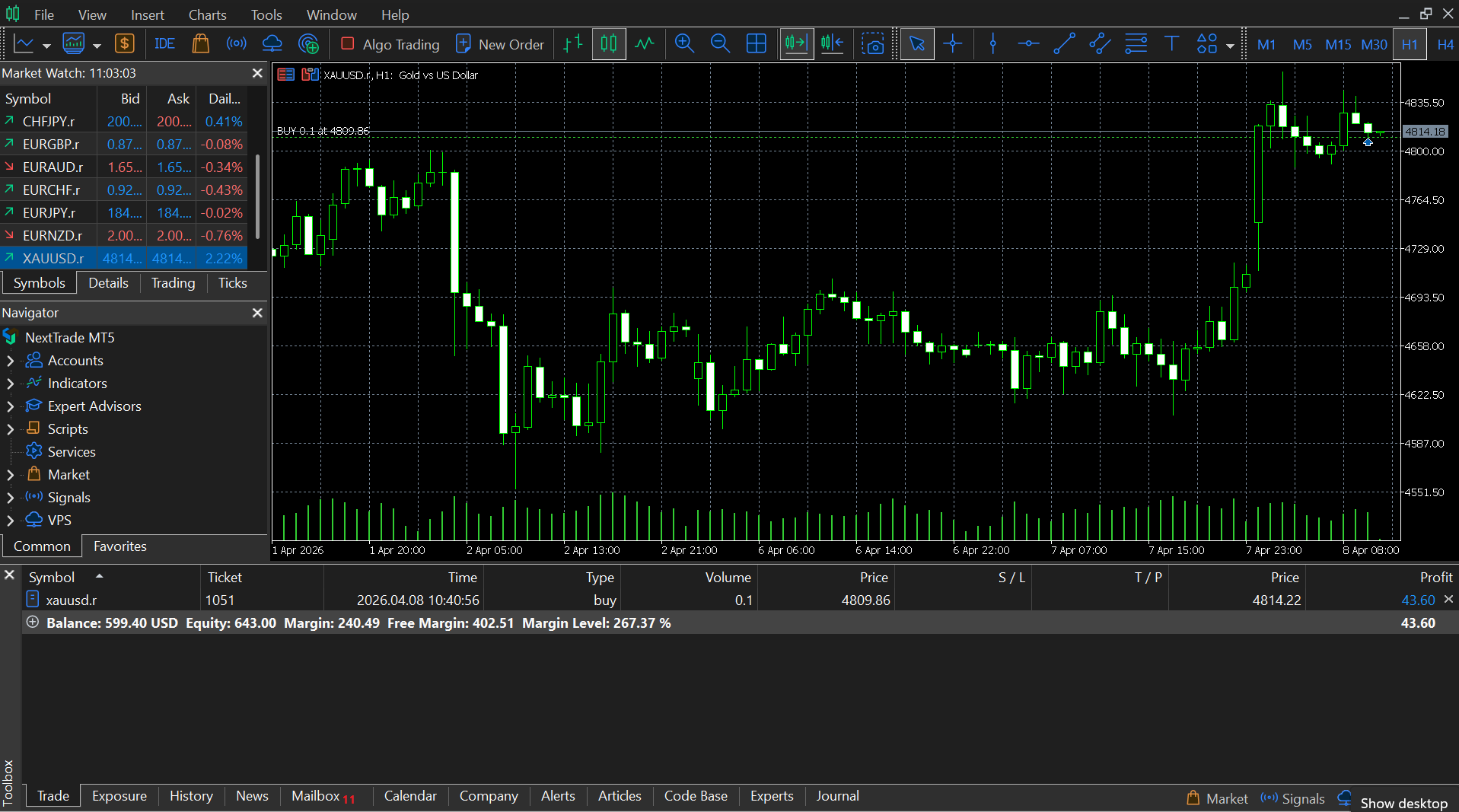
MT5's charting engine is built for serious technical analysis. 21 timeframes, multiple chart types, and the ability to create custom indicators in MQL5 give you complete analytical control.
- 21 chart timeframes (M1 to MN)
- Candlestick, bar, and line charts
- 38 built-in technical indicators
- 44 graphical analysis objects
- Trend lines, channels, Fibonacci tools
- Multi-chart window layouts
- Custom indicator support (MQL5)
- Template saving and sharing
- One-click chart trading
- Tick chart support
- Detachable chart windows
- Crosshair and data window
Algorithmic trading Ecosystem.
MT5's MQL5 ecosystem gives you the tools to build, test, deploy, and share automated strategies.
MQL5 programming language
A C++-based language purpose-built for trading. Create Expert Advisors, custom indicators, scripts, and libraries. Full IDE included with MetaEditor.
MetaEditor IDE
Integrated development environment with code highlighting, auto-complete, debugger, and profiler. Write, compile, and test your MQL5 programs without leaving the ecosystem.
Strategy Tester
Multi-threaded backtesting engine that tests strategies against historical tick data. Supports multi-currency testing, optimization, and visual replay mode.
MQL5.com marketplace
Access over 100,000 Expert Advisors, indicators, and scripts created by the global MQL5 community. Purchase, rent, or download free tools directly from the platform.
Built-in marketplace tools
Access additional tools and utilities directly within the MT5 ecosystem. Review statistics and platform features before integrating any third-party MQL5 add-ons into your workflow.
Advanced order types.
Six pending order types plus market execution. Full control over how and when your trades are placed.
- Market order
- Execute at the current market price.
- Buy Limit
- Buy at a specified price below the current market.
- Sell Limit
- Sell at a specified price above the current market.
- Buy Stop
- Buy at a specified price above the current market.
- Sell Stop
- Sell at a specified price below the current market.
- Buy Stop Limit
- Combines Stop and Limit: triggers a Buy Limit when price reaches the stop level.
- Sell Stop Limit
- Combines Stop and Limit: triggers a Sell Limit when price reaches the stop level.
- Stop loss / take profit
- Attach SL/TP to any order for automatic risk management and profit taking.
Trade anywhere. Any device.
MT5 is available on desktop, web, and mobile. Your charts, positions, and EAs stay synchronized across all devices.
MT5 WebTrader
Any browser
Trade directly from Chrome, Firefox, Safari, or Edge. No installation required. Full charting, one-click trading, and account management from any computer.
- No download required
- All chart types
- 30+ indicators
- One-click trading
MT5 is built for.
The traders and strategies that get the most from MetaTrader 5.
- Algorithmic traders
- MQL5 Expert Advisors and the Strategy Tester support automated trading on MT5.
- Technical analysts
- 21 timeframes, 38 indicators, 44 analytical objects, and multi-chart layouts support detailed technical analysis.
- Multi-asset traders
- Trade forex, metals, energies and indices from a single terminal and one account.
- Discretionary traders
- MT5's deep charting, indicators, and order-type set give discretionary traders the precision and flexibility they need across multiple asset classes.
- Hedge fund / prop desk traders
- Netting and hedging modes, Depth of Market, and multi-currency testing for professional operations.
- EA developers and vendors
- MetaEditor IDE, MQL5 community, and the MQL5.com marketplace create a complete ecosystem for developing and distributing trading tools.
MT5 powered by NextTrade.
You get MetaTrader 5 with NextTrade's published trading conditions.
Transparent execution
NextTrade routes your MT5 orders through transparent infrastructure. No re-quotes.
Spreads from 0.0 pips
Trade 130+ instruments on MT5 with spreads from 0.0 pips on Raw and VIP accounts.
FSC Mauritius Regulated
Your MT5 account is regulated by the FSC of Mauritius with segregated client funds held with regulated banking partners.
Dedicated support
Get help with MT5 setup, EA configuration, and account questions from our expert support team, Monday to Friday.
Up to 1:1000 leverage
Dynamic leverage up to 1:1000 on major forex pairs. Three account types: Standard, Raw, and VIP.
Easy setup
Download MT5, enter your NextTrade credentials, and start trading. Full setup guides and video tutorials available.
MT5 FAQs.
- Is MetaTrader 5 free to use?
- Yes. MT5 is free to download and use with your NextTrade account. There are no platform fees. You only pay the standard trading spreads and commissions.
- What is the difference between MT4 and MT5?
- MT5 is the successor to MT4 with significant upgrades: 21 timeframes (vs 9), 6 order types (vs 4), multi-asset support, built-in economic calendar, improved Strategy Tester, and the modern MQL5 programming language.
- Can I run Expert Advisors on NextTrade MT5?
- Yes. NextTrade fully supports Expert Advisors on MT5. You can install EAs from the MQL5 marketplace or build your own in MetaEditor.
- Does MT5 support hedging?
- Yes. NextTrade MT5 accounts support hedging mode, which allows you to hold multiple positions on the same instrument (including opposite directions). Netting mode is also available.
- Can I use MT5 on Mac?
- Yes. MT5 is available for macOS via direct download. You can also use the WebTrader version in any browser on Mac, or the mobile app on iOS.
- How do I connect MT5 to my NextTrade account?
- Download MT5, select the NextTrade server, and enter your account credentials provided at registration. Full setup guides with screenshots are available in our Help Center.
Start trading on MetaTrader 5.
Open your NextTrade account, download MT5, and start trading 130+ instruments with spreads from 0.0 pips. Setup takes under 5 minutes.